Airline Check In Online
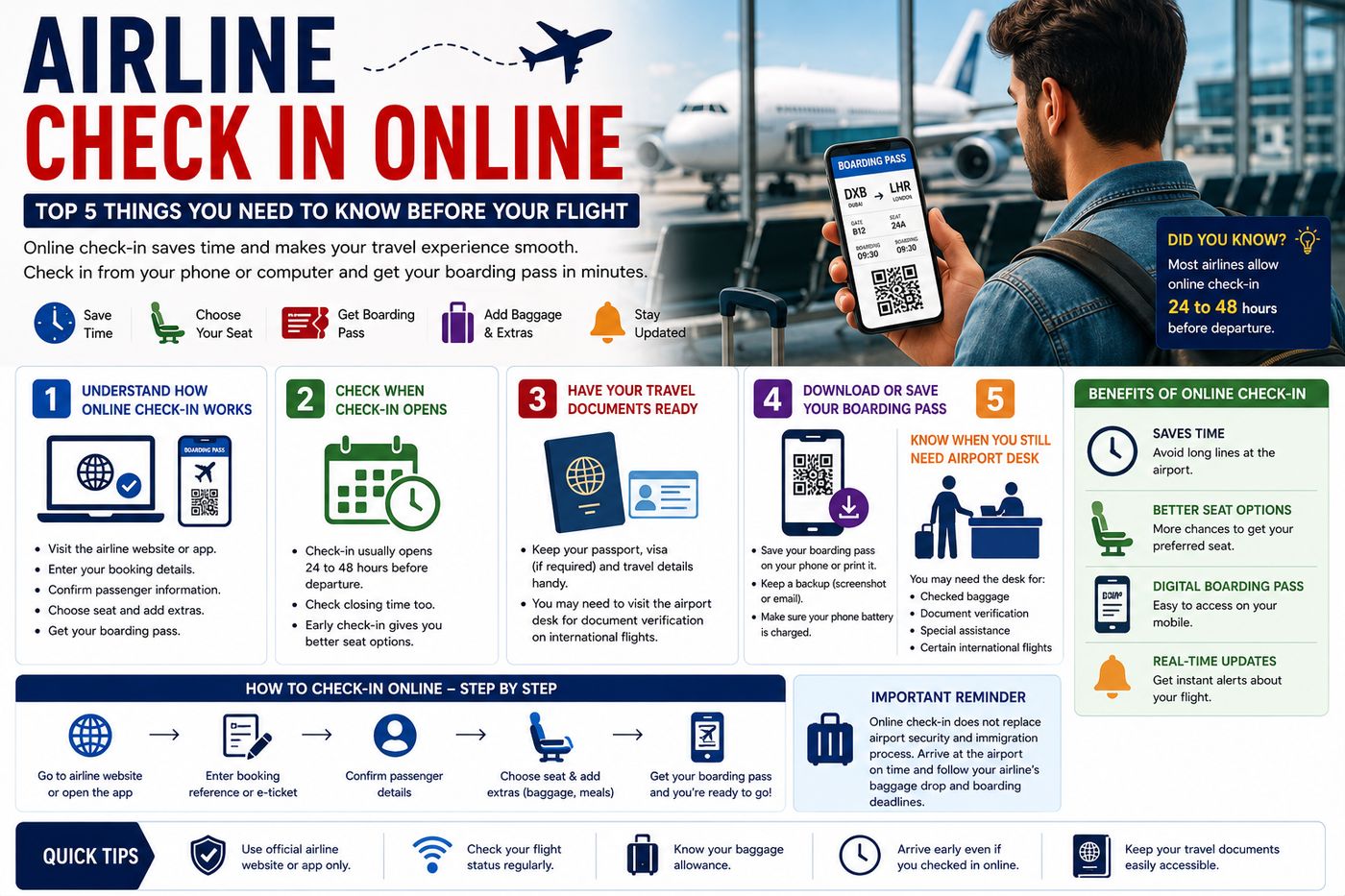
Online check-in has made air travel faster and more convenient. Instead of waiting in a long airport check-in line, many passengers can complete the process using an airline website or mobile app before arriving at the airport.
With airline check in online, travelers can often confirm their flight, choose or review a seat, add travel information, and receive a digital or printable boarding pass. However, the exact process and opening times vary between airlines, airports, and destinations.
This complete guide explains how online airline check-in works, what you need, and the top five things to remember before your flight.
Read More:Airport Duty Free Shopping Guide
Top 5 Things to Know About Airline Check In Online
1. Understand How Online Airline Check-In Works
The first step is understanding what airline check in online actually means.
Online check-in allows eligible passengers to complete part of the airport check-in process before reaching the terminal. Depending on the airline, you may use:
- The airline’s official website
- The airline’s mobile app
- A confirmation email link
To begin, you usually need information such as:
- Booking reference
- Reservation number
- Ticket details
- Last name
- Flight number
Once your booking is located, the airline may ask you to confirm passenger details and complete any required travel information.
What Can You Do During Online Check-In?
Depending on the airline and ticket, you may be able to:
- Confirm your flight
- Select or change your seat
- Add passport information
- Confirm contact details
- Pay for additional baggage
- Purchase extra services
- Receive your boarding pass
After completing the process, you may receive an online boarding pass on your phone, by email, or as a document you can print.
2. Check When Online Check-In Opens
One of the most important parts of online flight check-in is knowing when the service becomes available.
Different airlines have different check-in windows.
Some airlines may allow passengers to check in:
- 24 hours before departure
- 48 hours before departure
- Several days before departure
The closing time can also vary. Some airlines close online check-in several hours or minutes before departure.
Why Should You Check In Early?
Early check-in may help you:
- Confirm your travel plans
- Get a preferred available seat
- Download your boarding pass
- Save time at the airport
- Receive important flight updates
However, completing online check-in does not mean you can arrive late at the airport.
You must still follow your airline’s baggage-drop, security, immigration, and boarding deadlines.
Important Tip
Always check your airline’s official website or app for the exact opening and closing time for your specific flight.
3. Have Your Travel Documents Ready
For domestic flights, the web check-in for flights process may be relatively simple.
International travel can require additional information and documents.
Before checking in, keep these ready:
- Passport
- Booking reference
- Visa, if required
- Travel documents
- Destination address, if required
- Emergency contact information
- Any other information requested by the airline
Some international passengers may complete online check-in but still need to visit the airport check-in desk for document verification.
This can happen when an airline needs to check:
- Passport validity
- Visa requirements
- Entry permissions
- Transit documentation
- Destination-specific travel documents
Keep Your Documents Accessible
Do not pack your passport or important documents inside checked baggage.
Keep them in your:
- Personal bag
- Travel wallet
- Carry-on luggage
4. Download or Save Your Airline Boarding Pass
After completing airline check in online, the next important step is saving your boarding pass.
You may receive it through:
- The airline’s mobile app
- SMS or notification
- A downloadable file
- A printable version
A digital boarding pass can be convenient because you do not need to carry a paper copy in many situations.
However, you should make sure your phone is:
- Charged
- Easy to access
- Working properly
Save a Backup
It can be useful to keep a backup of your travel information.
For example:
- Save the boarding pass in your mobile wallet if supported.
- Take a screenshot where appropriate.
- Keep your booking reference available.
- Carry a charger or permitted power bank.
Some airports, airlines, or destinations may have different boarding-pass procedures, so always follow the instructions provided for your flight.
5. Know When You Still Need to Visit the Airport Desk
Online check-in can save time, but it does not always eliminate the need to visit an airport counter.
You may still need to go to the airline desk if:
- You have checked baggage.
- Your passport requires verification.
- You are traveling internationally.
- Your boarding pass cannot be issued online.
- Your booking requires additional review.
- You need special assistance.
- Your airline requests document verification.
Checked Baggage
If you have checked luggage, you may need to use:
- A baggage-drop counter
- A self-service bag-drop machine
- A traditional airline check-in desk
Remember to check your airline’s:
- Baggage weight limit
- Bag size allowance
- Number of permitted bags
- Baggage-drop closing time
Online check-in can make the process faster, but arriving too late for baggage drop could still cause problems.
How to Check In Online for a Flight
Here is a simple step-by-step airport check-in guide.
Step 1: Visit the Airline’s Official Website or App
Use the airline that operates your flight whenever possible.
Look for options such as:
- Check In
- Manage Booking
- My Trips
- Online Check-In
Step 2: Enter Your Booking Information
You may need to enter:
- Booking reference
- Last name
- Ticket number
- Flight details
Step 3: Confirm Passenger Details
Check that your:
- Name
- Flight
- Date
- Destination
are correct.
For international flights, enter travel document information carefully.
Step 4: Choose Your Seat
If seat selection is available, choose from the seats currently offered.
Some airlines provide free seat selection for certain fares, while others may charge an additional fee.
Step 5: Add Baggage or Extra Services
Depending on your booking, you may be able to:
- Add checked baggage
- Purchase extra baggage
- Select additional services
Always check the total cost before confirming.
Step 6: Get Your Boarding Pass
Download, print, or save your boarding pass.
Then check:
- Boarding time
- Gate information, if available
- Departure terminal
- Flight status
Mobile Check-In vs Web Check-In
Both options can make travel easier.
Mobile Check-In
Mobile check-in is completed through an airline app.
Advantages may include:
- Easy access to your boarding pass
- Flight notifications
- Gate updates
- Mobile travel information
Web Check-In
Web check-in is usually completed through a browser on:
- A computer
- Tablet
- Mobile phone
It can be useful if you do not want to download an airline app.
Which Is Better?
The best option depends on your preference. Both can help you complete the flight check-in process before arriving at the airport.
Online Check-In for International Flights
An international flight check-in may involve more requirements than a domestic flight.
Before checking in, confirm:
- Passport validity
- Visa requirements
- Transit requirements
- Destination entry rules
- Airline baggage rules
Even if your online check-in is successful, the airline may still ask you to visit the check-in counter before security.
This is particularly common when travel documents need to be physically checked.
Benefits of Airline Online Check-In
There are several advantages to checking in online.
Save Time
You may avoid part of the traditional check-in process.
Choose Available Seats
Checking in early may give you more available seat options, depending on the airline and fare.
Receive a Digital Boarding Pass
A mobile boarding pass can make your travel documents easier to manage.
Get Flight Updates
Airline apps may provide notifications about:
- Delays
- Gate changes
- Boarding times
- Flight updates
Prepare Before Leaving Home
You can complete important travel steps before starting your journey to the airport.
Common Online Check-In Problems
Sometimes passengers experience problems during the online airline check-in process.
Online Check-In Is Not Available
Possible reasons include:
- Check-in has not opened yet.
- The check-in deadline has passed.
- Your flight requires document verification.
- Your airport or route has different procedures.
Boarding Pass Cannot Be Issued
You may need to visit the airport desk for verification.
Wrong Passenger Information
Check your booking carefully. If important details are incorrect, contact the airline through its official support channels.
App or Website Problems
Try:
- Refreshing the page.
- Using another browser.
- Using the airline’s official app.
- Checking your internet connection.
- Visiting the airport check-in desk if necessary.
Top Tips for a Smooth Online Check-In Experience
1. Check In as Soon as Eligible
Set a reminder for when your airline opens online check-in.
2. Use Official Airline Platforms
Avoid entering your booking details on unknown websites.
3. Check Your Passport Details Carefully
A small mistake can cause problems.
4. Save Your Boarding Pass
Keep it accessible even if your internet connection is unavailable.
5. Check Airport Deadlines
Online check-in does not replace baggage-drop or boarding deadlines.
6. Monitor Your Flight
Check the latest:
- Departure time
- Terminal
- Gate
- Delay information
Frequently Asked Questions
How do I check in online for my flight?
Visit your airline’s official website or mobile app, enter your booking details, confirm passenger information, and follow the instructions to receive your boarding pass.
Is online airline check-in free?
Online check-in is often available without an additional charge, but optional services such as seat selection or extra baggage may cost extra depending on the airline and ticket.
Do I need to print my boarding pass?
Not always. Many airlines accept digital boarding passes, but requirements can vary by airline and airport. Check your airline’s instructions before traveling.
Can I check in online for an international flight?
Yes, many international flights offer online check-in. However, you may still need to visit an airport desk for passport, visa, or other document verification.
How early can I check in online?
The opening time depends on the airline. Check your airline’s official website or app for the exact check-in window.
What happens if I cannot check in online?
Go to the airline’s airport check-in desk and allow enough time before the airline’s check-in deadline.
Final Thoughts
Using airline check in online can make your airport journey faster and more convenient. It allows many travelers to complete important steps before leaving home, including confirming flight details and receiving a boarding pass.
The Top 5 things to remember are:
- Understand how online airline check-in works.
- Check when your airline opens online check-in.
- Keep your travel documents ready.
- Download and save your boarding pass.
- Know when you still need to visit the airport desk.
Before every trip, check your airline’s official website or app for the latest information about online check-in, baggage, document requirements, and airport deadlines.

Naeem Abbas is a travel writer and frequent flyer with over 6 years of experience navigating airports across Asia, Europe, and the Middle East. He has flown with 40+ airlines and specializes in baggage policies, airport hacks, and honest airline reviews. Every guide on AirlineFeed is researched from official airline sources and real travel experience.
Naeem Abbas is a travel writer and frequent flyer with over 6 years of experience navigating airports across Asia, Europe, and the Middle East. He has flown with 40+ airlines and specializes in baggage policies, airport hacks, and honest airline reviews. Every guide on AirlineFeed is researched from official airline sources and real travel experience.